
Ceiling fans are trusted for cooling homes and saving energy, but when they stop spinning or slow down, the ceiling fan capacitor is often the hidden culprit. Many people overlook this small but vital part. If your fan hums but does not move, or if it spins slowly, you may need to test the capacitor. Learning how to test a ceiling fan capacitor is useful for homeowners, electricians, and anyone who enjoys DIY repairs. This guide walks you through every step, from safety to tools, testing methods, and troubleshooting, in clear and simple language.
What Is A Ceiling Fan Capacitor?
A ceiling fan capacitor is a small electrical component inside the fan’s housing. Its main job is to help start the fan’s motor and keep it running at different speeds. It stores and releases electricity in quick bursts, giving the motor a “push” to start spinning and change speeds.
Most modern fans use a start-run capacitor, which means the same part helps the fan both start and run. Some older fans use separate start and run capacitors.
Why Test A Ceiling Fan Capacitor?
Testing the capacitor helps you find out if it is working or not. If your fan has these problems, testing the capacitor should be your first step:
- The fan does not start, but the light works.
- The fan spins slowly, even at high speed.
- The fan hums but does not move.
- The fan only works at some speeds, not all.
A failed capacitor is the most common cause of these issues. Replacing a faulty capacitor is cheaper and easier than buying a new fan or calling an electrician.
Tools And Safety Precautions
Before you start, gather these tools and follow safety rules. Working with electricity is risky, so safety must come first.
Tools You Need
- Screwdriver set (usually Phillips and flat-head)
- Needle-nose pliers
- Multimeter (digital or analog, with capacitance measurement is best)
- Insulated gloves
- Voltage tester or non-contact tester
- Electrical tape
- Pen and paper (to note wire connections)
- Camera or smartphone (optional, for photos)
Safety Steps
- Turn off the power at the circuit breaker before touching the fan.
- Use a voltage tester to double-check that the wires are not live.
- Wear insulated gloves.
- Work in good light, using a sturdy ladder.
- Never touch exposed wires with bare hands.
- If you are unsure, ask a qualified electrician for help.
Many beginners forget to check the power at the breaker and only use the wall switch. This is dangerous because the fan may still be live. Always use the main breaker.
How Does A Ceiling Fan Capacitor Work?
The capacitor stores a small charge of electricity and then releases it to give the fan’s motor a boost. This is called “phase shifting.” It helps the fan start, and in multi-speed fans, it helps control speed.
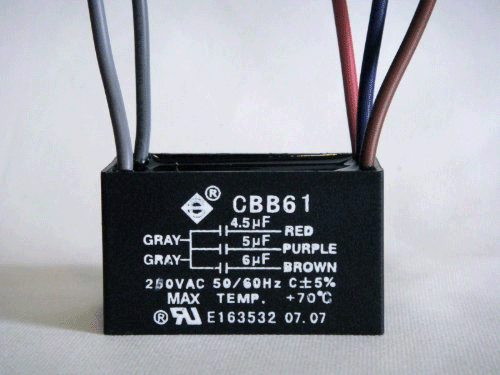
Some fans have a single capacitor; others have a dual capacitor (with two values in one body). The values are measured in microfarads (μF), usually marked on the capacitor.
Example: A capacitor may be labeled “2.5μF + 4μF 250V,” which means it has two capacitors inside, one for starting (2.5μF) and one for running (4μF), rated for 250 volts.

Credit: diy.stackexchange.com
Signs Of A Bad Ceiling Fan Capacitor
Capacitors can fail for several reasons: age, heat, power surges, or poor quality. Here are common signs:
- The fan does not start or is stuck.
- The fan makes a humming or buzzing noise but does not spin.
- The fan runs only at one speed or some speeds.
- The fan runs slowly, even on the highest setting.
- The fan wobbles or stops after a few seconds.
Physical signs include bulging, leaking, or burnt marks on the capacitor.
Preparing To Test The Capacitor
Testing is simple, but you must remove the fan’s housing and sometimes disconnect wires. Here’s how to get ready:
- Turn off the main power at the breaker.
- Remove the fan canopy (the cover near the ceiling).
- Locate the capacitor—it is usually a small black or gray cylinder or box with wires.
- Take a photo or note which wire goes where. Capacitor wires are often color-coded, but taking a photo helps during reassembly.
- Discharge the capacitor by touching both terminals with a screwdriver with an insulated handle. This step is crucial; capacitors can hold a charge even when power is off.
How To Test A Ceiling Fan Capacitor With A Multimeter
The multimeter is the best tool for testing. There are two main ways:
- Capacitance test (best, if your meter supports μF)
- Resistance (ohm) test (if your meter does not support capacitance)
Capacitance Test (μf Setting)
- Set your multimeter to the capacitance (μF) setting.
- Disconnect the capacitor from the fan completely.
- Touch the meter leads to the capacitor terminals (it does not matter which way).
- Read the value on the display.
If the value is within 10% of the rated value (printed on the capacitor), it is good. If it is much lower, or if the meter shows “0” or “OL,” the capacitor is bad.
Example:
- Capacitor rated at 4μF
- Meter reading: 3.8μF (good, within 10%)
- Meter reading: 1.0μF (bad, too low)
- Meter shows “0” or “OL” (open line) (bad, failed)
Resistance (ohm) Test
If your multimeter does not have a capacitance setting, use the resistance (ohms or Ω) setting.
- Set the meter to highest resistance (usually 20K or 200K ohms).
- Connect the meter leads to the capacitor terminals.
- The meter should show a low resistance at first and then slowly move toward infinity (open circuit) as the capacitor charges.
- Reverse the leads and check again.
A good capacitor will show this “charging” behavior. A failed capacitor will show zero (short) or infinity (open) all the time.
Testing Dual Capacitors
Some ceiling fans use dual capacitors, with three or four wires. The wires are usually labeled:
- C (common)
- F (fan)
- S (start)
Check the wiring diagram on the capacitor body. Test between C and F, and C and S, separately. Each section should match its labeled value.
How To Identify And Read Ceiling Fan Capacitor Values
Capacitors are marked with values like 2μF, 3.5μF, 5μF, etc., and voltage ratings such as 250V or 400V.
- ΜF means microfarads (the unit of capacitance).
- V means volts (maximum voltage the capacitor can handle).
Never replace a capacitor with one of a lower voltage rating. Always match or exceed the voltage value. It’s usually safe to use a capacitor with a slightly higher μF value (up to 10%), but never lower.
Example Markings
- “3.5μF 250V” means 3.5 microfarads, rated for 250 volts.
- “2μF + 4μF 250V” means two capacitors in one body.
Sometimes, capacitors have codes or color bands. If unsure, look up the model or ask the manufacturer.
Removing And Replacing The Capacitor
If your test shows the capacitor is bad, here is how to remove and replace it:
- Make sure power is off and the capacitor is discharged.
- Note or photograph the wire connections.
- Use needle-nose pliers to gently pull the wires off the terminals.
- Remove any mounting screws or clips.
- Take the faulty capacitor to a hardware or electronics store, or search online for an exact replacement.
- Match the μF and voltage values.
- Connect the new capacitor wires as before. If you are unsure, refer to your photo or notes.
- Secure the capacitor in place, replace the canopy, and restore power.
Pro tip: Some fans use push-in connectors, others use screws or solder. Handle wires carefully to avoid breaking them.
Troubleshooting Common Problems
Testing the capacitor is sometimes not enough. Here are related issues and what to check:
The Fan Still Does Not Start
- Check the wall switch and wiring.
- Make sure the pull chain is not broken.
- Test the fan motor (see below).
The Fan Runs Slowly
- Double-check the capacitor value.
- Make sure the blades are not bent or dirty.
- Lubricate the motor bearings.
The Fan Hums Or Buzzes
- This usually means the capacitor is weak.
- Replace the capacitor and check again.
The Fan Works On Some Speeds Only
- Multi-speed fans use different capacitor sections for each speed.
- A bad dual or triple capacitor may cause this.
- Test each section and replace if needed.
The Fan Oscillates Or Wobbles
- Not a capacitor issue. Check the mounting, blades, and balancing kit.
Testing The Motor (when The Capacitor Is Good)
If your capacitor tests fine but the fan still does not work, the problem may be the motor. Motor testing is more complex, but here is a basic check:
- With the power off, check for burnt smell or melted wires.
- Use your multimeter’s resistance setting to test the motor windings. Compare to known good values (usually in the 5–100 ohm range).
- If windings are open (infinite resistance) or shorted (zero), the motor is bad.
Replacing a motor is harder and more costly than replacing a capacitor.
Testing Without Removing The Capacitor
Some advanced digital multimeters allow in-circuit testing (testing without removing the capacitor). However, results are less accurate because the circuit is still connected. For beginners, always disconnect the capacitor for a true reading.
Practical Examples And Real-life Scenarios
Let’s look at two examples to see how testing works in real homes.
Example 1: Fan Hums But Does Not Spin
Sarah’s ceiling fan is humming but not moving. She checks the light and it works, so power is reaching the fan. She turns off the breaker, removes the canopy, and finds a black, slightly swollen capacitor.
She tests with a digital multimeter (μF setting) and finds “0. 3μF” on a 4μF capacitor. She replaces it with a new 4μF 250V capacitor. The fan starts working perfectly.
Example 2: Fan Runs Only At High Speed
Mike’s fan only works at the fastest speed. He finds a dual-value capacitor (2. 5μF + 4μF). Testing shows the 4μF section is fine, but the 2. 5μF reads “0. ” He replaces the dual capacitor. Now, all speeds work again.
Comparison Of Testing Methods
For clarity, here is a comparison of the three most common testing methods:
| Method | Accuracy | Tools Needed | Skill Level | Best For |
|---|---|---|---|---|
| Capacitance (μF) Test | High | Digital multimeter with μF | Beginner–Expert | Most users |
| Resistance (Ohm) Test | Medium | Analog or digital multimeter | Beginner | If μF setting not available |
| In-Circuit Test | Low–Medium | Advanced digital meter | Expert | Quick checks |
How To Choose The Right Replacement Capacitor
If your capacitor is faulty, buying the right replacement is crucial.
Key Factors To Check
- ΜF Value: Match as closely as possible. A small (5–10%) increase is acceptable, but never go lower.
- Voltage Rating: Must be equal or higher than the original.
- Physical Size: Make sure it fits inside the fan housing.
- Wire Connections: Some capacitors use push-on terminals, others use soldered wires.
- Number of Wires/Sections: Single, dual, or triple value. Match the old one.
Common Buyer Mistakes
- Buying a capacitor with a lower voltage rating (this can cause early failure).
- Choosing the wrong μF value (fan will run too slow or too fast).
- Not checking the number of wires.
- Mixing up the wire connections during installation.
Data Table: Typical Ceiling Fan Capacitor Values
Here’s a quick reference for common ceiling fan capacitor values:
| Fan Speed | Capacitor Value (μF) | Voltage (V) | Wires |
|---|---|---|---|
| Single speed | 2–5 | 250–400 | 2 |
| 3-speed (dual cap) | 2.5 + 4 | 250–400 | 3 |
| 5-speed (triple cap) | 1.5 + 2.5 + 3.5 | 250–400 | 4 |
What If The Capacitor Looks Fine?
Capacitors can fail without visible signs. Even if it looks okay (no bulging or leaks), it may be internally damaged. Always test with a meter.
Many beginners make the mistake of replacing only visually damaged capacitors. Invisible faults are common, especially after a power surge.
Where To Buy Replacement Capacitors
You can buy ceiling fan capacitors at:
- Local hardware stores
- Electrical supply shops
- Online retailers (Amazon, eBay)
- Manufacturer’s service centers
Always compare the μF and voltage. When shopping online, check reviews for quality. Cheap, no-name capacitors often fail quickly.
For more details on capacitor types and ratings, see Wikipedia’s Capacitor Article.
How Often Should You Test Or Replace A Fan Capacitor?
A quality ceiling fan capacitor can last 5–10 years under normal use. If your fan is used daily, test the capacitor every 3–5 years, especially if you notice speed issues.
Frequent power surges, heat, or humidity can shorten lifespan. If your home has many electrical storms, consider checking your fans more often.
Credit: www.cincocapacitor.com
Tips For A Smooth Testing And Replacement Experience
- Always label or photograph wire connections.
- Keep the fan’s manual for wiring diagrams.
- Use only insulated tools.
- Double-check the new capacitor’s values before installing.
- Do not force wires or bend terminals.
- If in doubt, ask an electrician.
Non-obvious Insights Most Beginners Miss
- A capacitor can be “weak,” not just dead: Even if your fan still spins, a capacitor with a lower μF value than rated will cause slow or unreliable operation. Always test the actual value.
- Fans with remotes often hide capacitors in the receiver box: Some fans with remote controls use integrated capacitors inside the receiver housing, not in the usual canopy spot. Check the manual before searching.

Credit: www.youtube.com
Frequently Asked Questions
What Happens If I Use The Wrong Capacitor Value?
Using a capacitor with the wrong μF value can cause the fan to run too slowly, too fast, or not at all. A lower value can prevent startup; a higher value can overheat the motor. Always match as closely as possible.
Can I Test A Capacitor Without A Multimeter?
It is possible but not recommended. You can swap in a new capacitor to see if the fan works, but this does not confirm the old one is bad. A multimeter gives a true test and helps avoid guesswork.
Why Do Capacitors Fail So Often In Ceiling Fans?
Heat, age, poor quality, and power surges are the main reasons. Fans run for many hours, often in hot rooms. Cheap capacitors fail faster. Using the wrong value also shortens lifespan.
Is It Safe To Replace A Ceiling Fan Capacitor Myself?
Yes, if you turn off power at the breaker, use insulated tools, and follow safety rules. Always check for live wires before starting. If you are unsure, call a professional.
How Do I Know If The Problem Is The Motor, Not The Capacitor?
If the capacitor tests good and the fan still does not run, the motor may be faulty. Signs include burning smell, visible damage, or winding resistance out of normal range. Motor repair is more complex and costly.
Testing a ceiling fan capacitor is a practical skill that saves time and money. With patience, the right tools, and safe practices, almost anyone can diagnose and fix common ceiling fan problems. By following this guide, you will keep your home cool and your fans spinning for years to come.