
A ceiling fan is a simple device, but getting it to move more air can feel mysterious. Many people buy a fan, install it, and expect strong airflow. Often, the results are disappointing—weak air movement, uneven cooling, or a hot, stuffy room. The good news: you can make your ceiling fan move more air with a few smart adjustments, upgrades, and maintenance habits. Whether you want a cooler bedroom, a more comfortable living room, or lower energy bills, understanding how to optimize your ceiling fan is key.
This article will guide you through every practical step—no technical jargon, no confusing diagrams, just clear advice. You’ll learn the main factors that affect airflow, how to spot common mistakes, and how to get the most out of your fan, even if you’re not an expert.
Let’s dive in and unlock the real power of your ceiling fan.
How Ceiling Fans Move Air
Before making changes, it helps to know how a ceiling fan works. Ceiling fans create air movement, not cold air. The spinning blades push air down or up, depending on the direction. This movement cools people by increasing evaporation from the skin.
The stronger the airflow, the cooler you feel.
Key factors that affect airflow include:
- Blade size and shape
- Motor power
- Mounting height
- Fan speed
- Direction of rotation
- Room size and layout
Understanding these factors will help you make smart choices as you improve your fan’s performance.
Choose The Right Fan Size
One of the most common reasons for poor air movement is using the wrong fan size for your room. A fan that’s too small or too large won’t move air efficiently.
Why Size Matters
A small fan in a big room won’t circulate enough air. A huge fan in a small room can create too much turbulence and even be uncomfortable. The right size means balanced airflow.
How To Measure
First, measure your room’s length and width in feet. Multiply these numbers to get the room’s square footage.
For example, a 12×15 foot room = 180 square feet.
Recommended Fan Sizes
Here’s a quick guide:
| Room Size (sq ft) | Fan Blade Span |
|---|---|
| Up to 75 | 29–36 inches |
| 76–144 | 36–42 inches |
| 145–225 | 44–50 inches |
| 226–400 | 50–54 inches |
| Over 400 | 56 inches or more |
Non-obvious insight: Many people install multiple small fans in a large room, but one large, high-quality fan often moves more air efficiently.

Credit: wjla.com
Adjust The Mounting Height
The distance between the fan and the ceiling (and the floor) affects how much air it can move.
Optimal Heights
- Ceiling to fan blades: At least 8–10 inches
- Fan blades to floor: 8–9 feet is best
If your fan is too close to the ceiling, airflow is restricted. If it’s too low, it can be unsafe or uncomfortable.
Using Downrods
If you have high ceilings, use a downrod—an extension pipe that lowers the fan. For each foot your ceiling is above 9 feet, add a 6-inch downrod.
Example: For a 12-foot ceiling, use a 24-inch downrod.
Practical tip: Never mount a fan directly against the ceiling unless it’s a “hugger” or low-profile model designed for that purpose.
Set The Correct Fan Direction
Ceiling fans can spin in two directions—clockwise and counterclockwise. The direction matters for airflow.
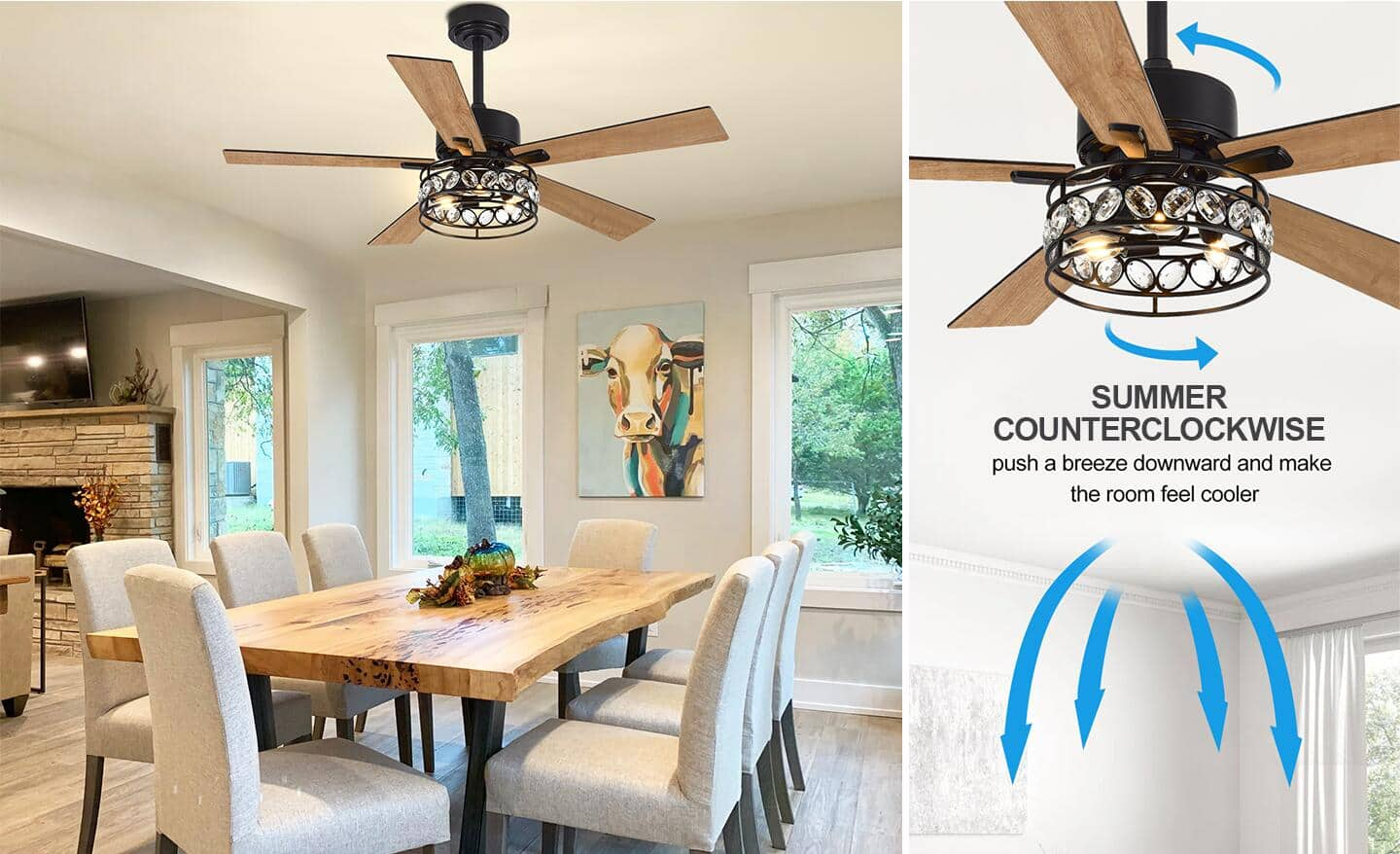
Summer (cool Down)
Set the fan to spin counterclockwise. This pushes air down and creates a cool breeze.
Winter (warm Up)
Switch to clockwise at low speed. This pulls cool air up and pushes warm air (which rises) down along the walls, helping heat the room evenly.
How To Change Direction
Most fans have a small switch on the motor housing. Flip it to reverse the direction.
Common mistake: Many people forget to switch fan direction with the seasons. Double-check each spring and fall.
Increase The Fan Speed
Fan speed directly affects the volume of air moved. Most ceiling fans have three speeds. Use the highest comfortable setting for the best airflow.
When High Speed Helps
- In large rooms
- During hot weather
- If the fan is mounted high
Some fans have variable speed controls for fine adjustments. If your fan only has slow speeds, it may be time for an upgrade.
Non-obvious insight: Running a fan at high speed doesn’t use much more energy than medium speed but moves much more air.
Clean And Maintain Fan Blades
Dust and dirt build up on fan blades over time. Dirty blades move less air and can wobble or make noise.
Cleaning Steps
- Turn off the fan and let blades stop.
- Wipe each blade with a damp cloth.
- Dry with a clean towel.
- Clean the motor housing and light fixtures.
How Often To Clean
Clean your fan at least once every two months. In dusty areas, monthly is better.
Extra tip: Use a pillowcase to catch dust—slide it over each blade, then pull off, trapping dirt inside.
Check And Tighten Blade Screws
Loose blades wobble and move less air efficiently. They can also make noise and wear out the motor.
How To Tighten
- Turn off the power at the switch or breaker.
- Use a screwdriver to check each blade screw.
- Tighten as needed.
Check screws every few months, especially if you notice wobbling or noise.
Upgrade To More Aerodynamic Blades
Blade shape and pitch (angle) affect how much air a fan can move.
Blade Pitch
Most standard fans have a blade pitch of 12–15 degrees. A steeper pitch moves more air but needs a stronger motor.
Material And Shape
- Wooden blades are quiet but can warp.
- Plastic or composite blades are durable and light.
- Metal blades are strong and good for industrial fans.
Some fans allow you to upgrade to better blades. Look for blades labeled “high airflow” or “aerodynamic. ”
Practical example: Swapping flat blades for curved, pitched blades can boost airflow by 15–20%.
Ensure The Fan Is Balanced
A wobbly fan cannot move air efficiently. It can also wear out faster and make annoying noises.
How To Balance A Fan
- Clean all blades.
- Make sure all screws are tight.
- Use a balancing kit (usually comes with new fans).
- Attach balancing clips to the blades, then test and move as needed.
Pro tip: If you lose your balancing kit, use a small coin and tape as a weight.
Use The Right Type Of Fan For Your Room
There are different types of ceiling fans, each suited to certain room sizes and conditions.
Types Of Ceiling Fans
| Type | Best For | Notes |
|---|---|---|
| Standard | Most rooms | Good for ceilings 8–9 feet high |
| Low-profile (“hugger”) | Low ceilings | Mounts close to ceiling |
| Dual-motor | Large/long rooms | Two adjustable heads |
| Outdoor/wet-rated | Patios, porches | Resists moisture and rust |
| Industrial/Commercial | Big spaces, high ceilings | Powerful motors, metal blades |
Using the wrong type can mean weak airflow or even damage in humid areas.
Consider Upgrading The Motor
The motor is the heart of the ceiling fan. Older or low-quality fans often have weak motors that can’t spin blades fast enough or push enough air.
Signs Of A Weak Motor
- Slow spinning even at the highest setting
- Overheating motor housing
- Humming or buzzing sounds
Solution: Upgrade to a fan with a high-performance motor. Look for “high CFM” (cubic feet per minute) ratings.
Data point: Top fans can move over 7,000 CFM. Budget fans may only move 2,000–3,000 CFM.
Install The Fan In The Best Location
Where you place your fan matters. If the fan is too close to walls or corners, air can’t circulate well.
Ideal Placement
- Center of the room
- At least 18 inches from walls or sloped ceilings
- Away from tall furniture or hanging lights
Non-obvious insight: In rooms with odd shapes, consider placing fans over the main seating or sleeping area for best effect.
Use Multiple Fans In Large Rooms
One fan can’t always cool a big space. In rooms over 400 square feet, two or more fans may be needed.
How To Space Multiple Fans
- Place fans so their airflow overlaps slightly
- Space them evenly across the ceiling
- Use fans with matching speeds and styles
Practical example: In a long living room, place one fan near each end to prevent dead air spots.
Replace Worn-out Capacitors
The capacitor helps start and run the fan motor. Over time, capacitors can fail, causing slow speeds or stopping the fan entirely.
Signs Of A Bad Capacitor
- Fan won’t start or runs only at one speed
- Humming sound but no movement
- Fan slows down over time
How to Replace: This is a quick, low-cost repair for most fans. Turn off power, remove the housing, and swap the capacitor for a new one with the same rating.
Safety tip: If you’re not comfortable with wiring, call a qualified electrician.
Remove Airflow Obstacles
Curtains, tall furniture, or hanging lights can block air movement.
Common Obstacles
- Tall bookshelves or cabinets under the fan
- Hanging light fixtures or chandeliers
- Ceiling beams close to the fan
Solution: Move or adjust obstacles, or relocate the fan if needed. The more open space under the fan, the better the airflow.
Use A Fan With High Cfm Rating
CFM (cubic feet per minute) is the standard measure of how much air a fan moves. Higher CFM means more airflow.
Comparing Cfm Ratings
| CFM Range | Airflow Quality |
|---|---|
| 2,000–3,000 | Low |
| 3,000–5,000 | Moderate |
| 5,000–7,000 | Strong |
| 7,000+ | Very strong |
How to Find CFM: It’s listed on the box or manual for new fans. If your fan’s CFM is low, consider an upgrade.
Add A Wall Or Remote Control
Controlling your fan easily means you’ll adjust it more often for comfort. Many fans support wall controls or remotes.
Benefits
- Change speed or direction without climbing up
- Fine-tune airflow for different needs
- Set timers or schedules for energy savings
Extra tip: Smart fan controls let you control the fan from your phone or with voice assistants.
Use Fans With More Blades (but Not Always)
Many people think more blades mean more air. That’s not always true.
Blade Count Vs. Airflow
- 3–4 blades: Often move air fastest, less drag
- 5–6 blades: Smoother, quieter airflow, sometimes less air at high speed
Key point: Motor strength and blade design matter more than blade count. Don’t assume a 5-blade fan is always better.
Practical example: Industrial fans with only 3 blades can move more air than decorative 5-blade fans.
Install Fans In The Right Rooms
Fans work best where people spend the most time.
Best Rooms For Fans
- Living rooms
- Bedrooms
- Kitchens
- Patios (with outdoor-rated fans)
Less effective: Bathrooms, closets, very high ceilings (over 15 feet).
Non-obvious insight: Installing a fan in your hallway can help move air between rooms, improving overall comfort.
Use Fans With Energy Star Ratings
ENERGY STAR-rated fans use up to 60% less energy and often have better motors and blades.
Benefits
- Save money on electricity
- Better airflow per watt
- Quieter operation
Look for the blue ENERGY STAR logo when buying a new fan.
Combine Fan And Air Conditioning
Ceiling fans don’t cool air—they cool people. Using your fan and air conditioner together can save money.
How To Combine
- Raise your AC thermostat by 4°F and use your ceiling fan
- You’ll feel just as cool, but use less energy
Research shows: This can reduce cooling costs by 10% or more.
Don’t Overload The Fan With Heavy Light Fixtures
Adding heavy light kits can slow the fan and reduce airflow.
What To Watch For
- Large or multiple bulbs
- Heavy glass or metal shades
Solution: Use lightweight, LED-based fixtures or fans with built-in lights.
Credit: www.homedepot.com
Upgrade To Modern, Efficient Fans
Older fans (especially those over 15 years old) are less efficient and may have worn motors or poor blade designs.
Signs It’s Time To Upgrade
- Fan is noisy or wobbly
- Low airflow even after cleaning/tuning
- No variable speed or remote control
Modern fans are quieter, move more air, and use less energy.
Consult The Manufacturer’s Manual
Your fan’s manual often includes specific advice for airflow, maintenance, and adjustments.
What To Look For
- Maximum blade angle and speed
- How to change direction or add controls
- Recommended cleaning schedule
Extra tip: If you lost your manual, search for your fan model online or check the manufacturer’s website.
When To Call A Professional
If you’ve tried all the tips above and your fan still isn’t moving enough air, it may need expert help.
Signs You Need Help
- Electrical problems or sparks
- Wobbling that won’t go away
- Old wiring or non-standard mounting
A licensed electrician can check wiring, balance, and recommend upgrades safely.
Frequently Asked Questions
How Do I Know If My Ceiling Fan Is Moving Enough Air?
Stand directly under the fan on high speed. You should feel a strong breeze. If not, check for dust, loose blades, or incorrect direction. Compare your fan’s CFM rating to recommended levels for your room size.
Does Using More Blades Always Mean Better Airflow?
No. More blades can sometimes mean less airflow because of added drag. The motor’s power and blade shape are more important. Three or four well-designed blades often move more air than five poorly shaped ones.
Can I Use A Ceiling Fan In Winter?
Yes. Set your fan to spin clockwise at low speed. This helps move warm air down from the ceiling without creating a draft. It makes heating more efficient.
Is It Safe To Install A Ceiling Fan Myself?
If you have basic electrical skills, you can install a fan using the manual. Always turn off power at the breaker and follow safety guidelines. For complex wiring, or if you’re unsure, hire a professional.
Where Can I Find More Information On Ceiling Fan Standards And Safety?
You can visit the ENERGY STAR Ceiling Fans page for more details about standards, ratings, and safety recommendations.
A ceiling fan is one of the best tools for comfort and energy savings. With the right size, setup, and a few smart upgrades, you can make any ceiling fan move more air and cool your home more effectively. Regular maintenance and understanding a few key principles will keep your fan running at its best for years.
Make these changes, and enjoy fresh, breezy comfort in every room.

Credit: smafan.com