
Storing a TV in a storage unit is something many people face when moving, renovating, or downsizing. At first, it may seem simple—just unplug it and put it away. But storing a TV wrong can lead to serious damage, both inside and out.
Modern TVs are delicate, with sensitive screens and electronics that don’t handle extreme temperatures, dust, or bumps very well. If you want your TV to work perfectly when you retrieve it, you need the right plan and careful handling from start to finish.
Many people make the same mistakes: wrapping the TV in the wrong materials, forgetting to label cables, or placing the TV flat instead of upright. These small errors can mean a cracked screen, internal damage, or lost accessories when you set up your TV again. This guide will help you avoid those problems. You’ll learn every step for storing a TV, from preparation and packing to choosing the best storage unit and keeping your TV safe for months or even years.
Whether you have a small bedroom TV or a big 4K flat screen, these steps work for all TV types. With real examples, expert tips, and practical advice, you’ll be able to store your TV with confidence and peace of mind.
Why Proper Tv Storage Matters
Many people underestimate how fragile modern TVs are. The thin screens, sensitive electronics, and delicate connectors make them easy to damage if handled wrong. Even a small crack or exposure to moisture can ruin a TV.
Temperature is a big factor. Most TVs work best between 50°F and 85°F (10°C to 29°C). If a storage unit gets too hot or too cold, the screen might warp, and the electronics could fail. Humidity is also dangerous—moisture can cause internal rust, mold, or electrical shorts.
Dust and pests are another concern. Tiny insects or dust can enter vents and damage the inside parts. Even sunlight can fade or damage the plastic. Storing your TV the right way protects your investment. A few hours of preparation can save you hundreds of dollars in repairs or replacement.
Preparing Your Tv For Storage
Before you move your TV to a storage unit, you must get it ready. Skipping preparation increases the risk of damage. These steps will protect your TV before it even leaves your home.
1. Unplug And Cool Down
Always turn off your TV and unplug it from the wall. Wait at least 30 minutes before packing—this gives the TV time to cool down and lowers the risk of static electricity. Never pack a hot TV.
2. Remove Cables And Accessories
Take out all cables, HDMI cords, power cords, and accessories like remotes or streaming devices. Wrap each cord separately using twist ties or rubber bands. Put these in a labeled ziplock bag so nothing gets lost.
For wall-mounted TVs, remove the mounting brackets. Keep screws and small parts in a separate, labeled bag.
3. Clean The Tv
Dust and fingerprints can cause stains or scratches over time. Use a microfiber cloth to gently clean the screen and frame. Never use paper towels—they can scratch the surface. If needed, use a screen-safe cleaner (never regular glass cleaner).
4. Take Photos
Before disconnecting everything, take photos of the back of your TV. This helps you remember where each cord goes when you set it up again. It’s a simple step that saves frustration later.
5. Organize And Label
Label all bags with cords and accessories. Write the TV model on each label, especially if you’re storing more than one device. This makes setup much easier and prevents mixing up parts.
Non-obvious tip: Put a copy of the TV manual or a QR code link to the manual in the bag with accessories. This helps if you forget how to reconnect something later.
Packing Your Tv For Maximum Protection
Packing is the most critical part of storing a TV. The right materials and methods prevent damage during transport and storage. Here’s how to do it right.
1. Use The Original Box (if Possible)
The best way to pack your TV is in the original box with all the foam inserts. These boxes are designed to fit your TV perfectly and provide the best protection.
- If you have the original box, check that the foam and cardboard inserts are still in good shape.
- Place the TV screen side down into the foam, then close the box securely.
- Tape the box shut with strong packing tape.
2. No Original Box? Use A Tv Moving Box
If you don’t have the original packaging, buy a TV moving box. These are available in most hardware or moving stores and can be adjusted to fit different TV sizes.
- Choose a box slightly larger than your TV.
- Use foam corners or thick bubble wrap to cushion all sides.
- Never let the screen touch the box directly.
3. Protect The Screen
The screen is the most fragile part. Place a soft, clean blanket or foam sheet over the screen before packing. Avoid anything rough that might scratch.
Pro tip: Never use newspaper—it can leave ink stains on the screen.
4. Wrap The Tv Securely
Wrap the entire TV in bubble wrap or a thick moving blanket. Pay extra attention to the corners and edges, which are more likely to get damaged.
- Wrap from top to bottom and secure with tape.
- Make sure tape never touches the screen.
5. Secure The Box
Once packed, gently shake the box. If you hear movement, add more padding. The TV should fit snugly with no room to shift.
6. Label Clearly
Write “Fragile: TV” and “This Side Up” on every side of the box. Use arrows to show which way the box should stand. This helps movers or helpers handle it correctly.
Hidden danger: Don’t write the TV brand or model on the outside of the box. This can attract thieves in some storage facilities.
Choosing The Right Storage Unit
Your storage unit is just as important as packing. A bad environment can ruin your TV even if you packed it well. There are a few key factors to consider.
1. Climate-controlled Vs Non-climate-controlled
Climate-controlled units keep the temperature and humidity steady, usually between 55°F and 85°F. This is the safest choice for TVs.
- Prevents heat, cold, and humidity damage
- Costs more, but protects valuable electronics
Non-climate-controlled units are cheaper but can get hot or cold depending on the weather. Only use these if you plan very short-term storage (less than a week) and live in a mild climate.
Tv Storage Needs Comparison
| Storage Type | Temperature | Humidity | TV Safety |
|---|---|---|---|
| Climate-Controlled | 55°F–85°F | 40%–60% | Very Safe |
| Non-Climate-Controlled | Varies | Varies | Risky |
2. Size Of The Unit
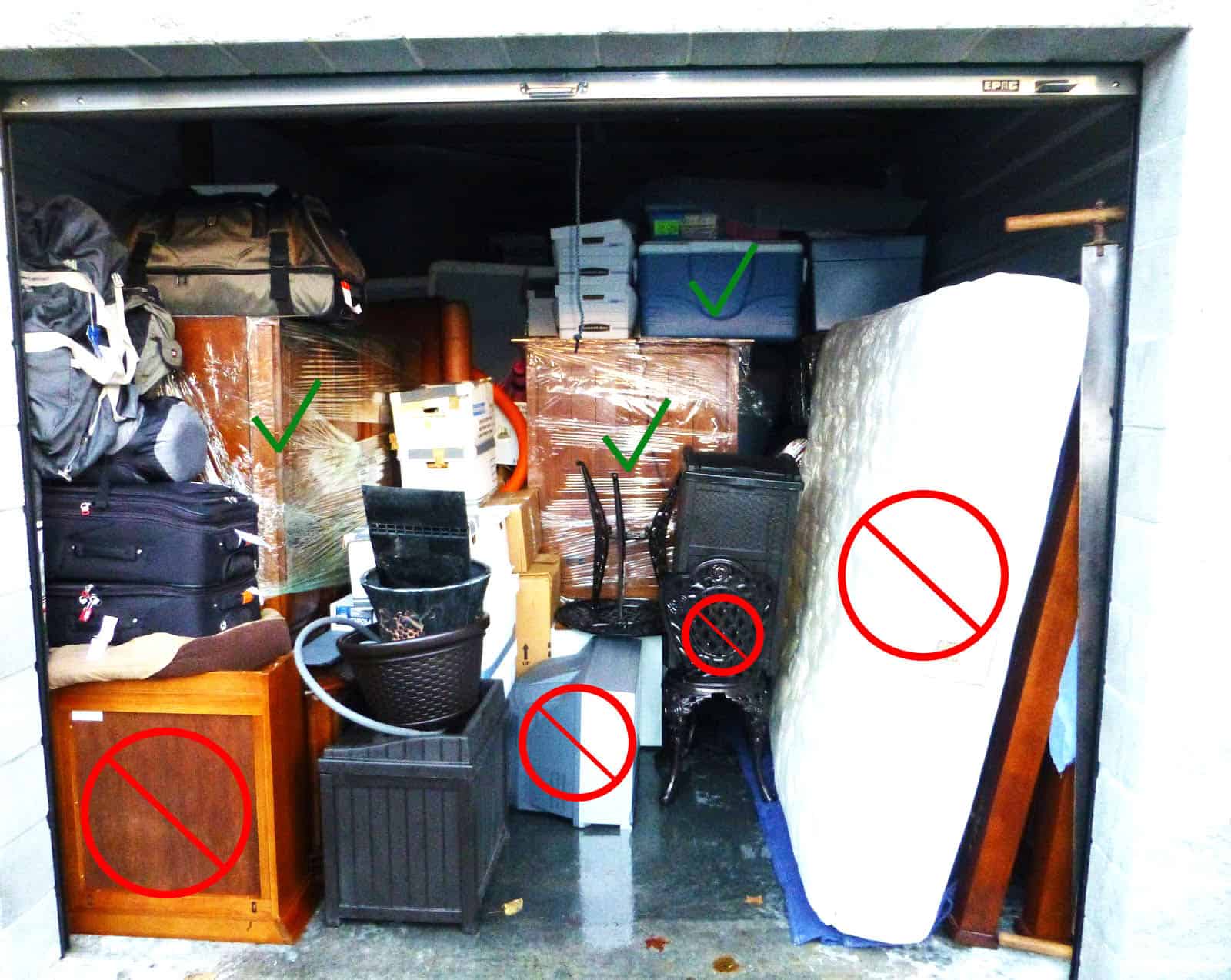
Choose a unit that gives you enough space to store your TV upright and away from heavy items. Don’t cram your TV into a small, crowded space.
- For one TV and a few boxes, a 5’x5’ unit is usually enough.
- For large TVs or multiple electronics, consider a 5’x10’ or larger unit.
3. Security Features
Look for units with good security: cameras, keypad access, and on-site staff. TVs are valuable and sometimes targeted by thieves.
4. Accessibility
Choose a unit you can access easily if you need to check on your TV or retrieve it quickly.
Insider tip: Some facilities have drive-up units, which make loading and unloading much easier for large, heavy TVs.
Transporting Your Tv Safely
Moving your TV from home to the storage unit is a risky moment. One drop or bump can ruin even a well-packed TV. Use these best practices to keep your TV safe on the road.
1. Use Two People
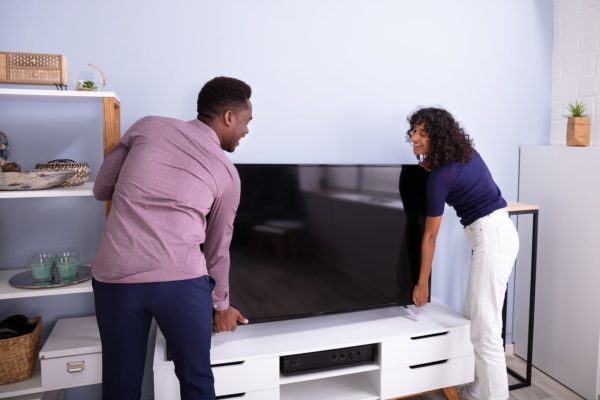
Even small TVs are awkward to carry alone. Always use two people, one on each side. Hold the TV upright and never carry it flat.
2. Keep Upright During Transport
Always keep your TV upright (vertical), both when carrying and in the vehicle. Laying a TV flat can cause the screen to flex or crack, even if it seems secure.
3. Secure In The Vehicle
Stand the TV upright in the moving truck or car. Place it against a flat surface (such as the back seat) and secure it with straps or bungee cords so it doesn’t tip or slide.
- Avoid placing anything heavy next to the TV.
- Use blankets or pads to protect from bumps.
4. Avoid Extreme Temperatures
Don’t leave your TV in a hot or freezing car. Move it quickly into the storage unit, especially in summer or winter.
Little-known fact: Rapid temperature changes can cause condensation inside the TV, which can permanently damage the electronics.
Placing Your Tv In The Storage Unit
How you position your TV inside the unit affects how well it survives storage. Placement matters just as much as packing.
1. Keep The Tv Upright
The most important rule: Store your TV upright, never flat. TVs are designed to stand vertically. Laying them flat, even in the box, puts pressure on the screen, which can cause cracks.
2. Place On A Raised Surface
If possible, keep the TV off the floor. Use pallets, shelves, or sturdy boxes to raise it. This protects from possible water leaks or cold from the concrete.
3. Allow Space Around The Tv
Leave a few inches of space on all sides. Don’t push the TV against walls or other items. Good airflow prevents moisture buildup and accidental bumps.
4. Don’t Stack Items On Top
Never stack boxes, bags, or any heavy item on top of your TV box. Even light items can warp the screen over time.
5. Keep Away From Doors And High-traffic Areas
Avoid placing your TV near the storage unit door or in pathways where things get moved often. This reduces the risk of accidental bumps.
6. Cover For Extra Protection
Drape a clean, soft sheet or moving blanket over the TV box for extra dust protection.
Tv Placement Safety Comparison
| Placement | Risk of Damage | Best for TV? |
|---|---|---|
| Upright on Raised Surface | Low | Yes |
| Flat on Floor | High | No |
| Stacked Under Boxes | Very High | No |
Extra tip: If your unit is in a flood-prone area, put a moisture absorber or silica gel pack inside the TV box for added protection.
Protecting Your Tv During Long-term Storage
If you plan to store your TV for more than a few weeks, take extra steps to protect it from long-term risks.
1. Use Moisture Absorbers
Humidity can cause mold, rust, or electrical problems over time. Place a moisture absorber (like DampRid or silica gel packs) in the storage unit, and if possible, inside the TV box.
2. Check The Unit Regularly
Visit your storage unit every month if possible. Check for signs of leaks, pests, or temperature problems.
3. Avoid Powering On Immediately
When you take your TV out of storage, let it sit in your home for a few hours before plugging it in. This lets the TV adjust to room temperature and prevents condensation inside the electronics.
4. Update Your Insurance
If your TV is expensive, make sure your storage insurance covers electronics. Many basic plans don’t cover damage from moisture or pests.
5. Prevent Pest Damage
Rodents and insects can chew through boxes and wires. Use pest deterrents like cedar blocks or electronic repellents.
Common mistake: Don’t wrap your TV in plastic wrap for long periods. This can trap moisture and lead to mold.
Common Mistakes To Avoid
Many TV owners make the same errors when storing their device. Avoid these to keep your TV safe.
1. Using The Wrong Packing Materials
- Don’t use newspaper or thin plastic bags for padding.
- Never use packing peanuts alone—they can shift and leave parts unprotected.
2. Storing The Tv Flat
This is the most common mistake. Laying a TV flat can bend or crack the screen, even if it seems safe inside the box.
3. Skipping Climate Control
If you store your TV in a non-climate-controlled unit, you risk permanent damage from heat, cold, or moisture.
4. Forgetting To Remove Batteries
Take batteries out of remotes and other accessories. They can leak acid and destroy electronics.
5. Not Labeling Boxes
If you store multiple TVs or electronics, unmarked boxes will make reassembly stressful and slow. Always label everything clearly.
Credit: www.selfstorageplus.com
Special Tips For Different Tv Types
TVs come in many forms—plasma, LCD, LED, and OLED. Each type has unique needs.
Plasma Tvs
Plasma TVs are especially sensitive to temperature changes. Store only in climate-controlled units and never lay them flat.
Lcd/led Tvs
These are lighter and less sensitive, but the screens can scratch or crack easily. Always protect the screen with foam or a blanket.
Oled Tvs
OLED screens are thin and flexible but can be damaged by pressure or bending. Never stack anything on top. Avoid extreme heat, which can cause “burn-in. ”
Smart Tvs
Smart TVs have more ports and internal hardware. Make sure all ports are protected from dust and pests. Update firmware before storage if possible.
Non-obvious insight: For all smart TVs, log out of accounts and reset to factory settings if you’re storing in a shared or public-access unit. This protects your personal data.
Tv Types And Storage Needs
| TV Type | Most Sensitive To | Special Precautions |
|---|---|---|
| Plasma | Temperature | Climate control, upright only |
| LCD/LED | Impact, scratches | Padded screen, no stacking |
| OLED | Bending, heat | Extra padding, avoid heat |
| Smart TV | Dust, data | Cover ports, reset data |
How Long Can You Store A Tv?
Most TVs can be stored safely for up to two years if you follow all the steps above. After two years, electronics may start to degrade, especially if exposed to bad conditions. For longer storage, check the TV every six months.
If you plan to store your TV for more than a year, consider selling or donating it instead—technology changes quickly, and the TV may be outdated by the time you use it again.

Credit: www.extraspace.com
Unpacking And Setting Up Your Tv After Storage
When you take your TV out of storage, don’t rush the setup. Follow these steps to keep your device safe and get it working quickly.
1. Let The Tv Adjust
Set the TV (still in the box) inside your home for a few hours before unpacking. This prevents condensation from forming inside the electronics.
2. Inspect For Damage
Check the box and TV for signs of water, pests, or physical damage. If you see any, do not plug in the TV—take it to a repair shop first.
3. Reconnect Cables Carefully
Use the photos you took before storage to reconnect cables. Make sure all ports are free of dust before plugging in.
4. Turn On And Test
Plug in your TV and turn it on. Test all functions (video, sound, apps). If something doesn’t work, check cables and settings before assuming the TV is broken.
5. Update Software
If you stored a smart TV, connect to Wi-Fi and update the firmware. This helps fix bugs and protects your TV from security risks.
Pro tip: If the TV doesn’t power on, check the fuse or circuit breaker first—storage units sometimes have power issues that can blow fuses.
Frequently Asked Questions
Can I Store My Tv In A Garage?
It’s not recommended. Most garages are not climate-controlled. Temperature swings and humidity can damage your TV’s screen and electronics. Always use a climate-controlled unit for best results.
How Do I Keep Moisture Out Of My Tv Box?
Place silica gel packs or a moisture absorber in the TV box and in the storage unit. Check every month and replace as needed. Avoid wrapping your TV in plastic for long periods, as this can trap moisture.
What If I Lost The Original Tv Box?
You can buy a TV moving box from hardware or moving stores. Use foam corners, bubble wrap, and a soft blanket to protect your TV. Make sure the box fits snugly and is labeled “Fragile: TV.”
Is It Safe To Store A Tv Flat?
No. Storing a TV flat can lead to pressure cracks or screen warping. Always store your TV upright, both during transport and in the storage unit.
How Long Can A Tv Stay In Storage?
With proper packing and climate control, most TVs can be stored for up to two years. For longer storage, check on your TV every six months and consider upgrading your insurance.
For more detailed information on electronics storage, you can visit the WikiHow guide on storing electronics.
Storing a TV isn’t just about finding a free corner in a storage unit. With the right preparation, packing, and placement, your TV will be ready for entertainment when you need it again—working perfectly, with no ugly surprises. Take care now, and your TV will thank you later.
Credit: www.smithvalleystorage.com