
Resetting an adjustable bed remote can be confusing if you have never done it before. Many people worry when their bed stops responding, or the remote starts acting strangely. You might wonder: is my bed broken? Do I need a new remote? In most cases, you don’t. With the right steps, you can reset your adjustable bed remote and get back to comfortable sleep. This guide explains the full process, including why resets are needed, how different brands vary, and what to do if things still don’t work. You’ll learn step-by-step instructions, what to look out for, and tips to avoid common mistakes.
Why Adjustable Bed Remotes Need Resetting
Adjustable beds use motors and electronics to move the head, foot, or whole bed. These parts communicate with a wireless remote. Sometimes, problems come up. The bed might not move, move the wrong way, or the remote might not talk to the bed at all. Resetting the remote and bed helps reconnect them.
Common reasons to reset:
- After a power outage
- If the bed does not respond to the remote
- When changing batteries
- After moving the bed to a new room
- If a new remote is being paired
- When the remote acts strangely (random movements, wrong lights, etc.)
Most adjustable beds are safe to reset. You won’t erase your bed’s memory for basic positions, but custom settings may need to be reprogrammed.
Understanding Adjustable Bed Remotes
Before resetting, it helps to know the basics of your adjustable bed remote and how it connects. Remotes can be wired (attached by a cable) or wireless (battery powered and uses radio signals).
Main Types Of Remotes
- Simple wired remote: Fewer problems, but not common with modern beds.
- Basic wireless remote: Controls head/foot positions, sometimes a massage feature.
- Advanced wireless remote: Has memory buttons, massage controls, under-bed lighting, and more.
Wireless remotes need to “talk” to a receiver box under the bed, usually by RF (radio frequency) or sometimes Bluetooth.
How Remotes Connect
Most remotes and beds are “paired” at the factory. If something goes wrong (power loss, interference, new remote), they might lose connection. Resetting or “re-pairing” makes them communicate again.
Pro tip: Look for a label under your bed frame or on the back of the remote for your model number. This will help you find the right steps later.
When Should You Reset Your Adjustable Bed Remote?
It’s not always clear when a reset is needed. Sometimes, a simple battery change or unplugging the bed solves the problem. But if you notice any of these, a reset is a good idea:
- The remote lights up but the bed does not move.
- The bed moves only sometimes.
- The wrong part of the bed moves (for example, the head moves when you press “foot”).
- The remote does nothing, but the bed has power (you hear motor clicks or see under-bed lights).
- You replaced the remote or receiver box.
Resetting is a safe first step. It can save you a service call and money.
Preparing For The Reset
Before you start, spend a few minutes getting ready. This will keep things simple and prevent damage.
- Unplug the bed from the wall. Wait at least 1 minute. This makes sure all power is drained from the electronics.
- Find your remote’s batteries. Open the battery cover and check if they are fresh. Replace them if you are unsure.
- Locate the receiver box. This is under your bed, often in the center or near the power cord.
- Have your model number ready. If you need to call support or find a manual, this will help.
- Clear the area under your bed. You may need to reach the receiver box, so move items out of the way.
Important: Never reset your bed while someone is lying on it. Motors may move suddenly during the process.
Credit: www.youtube.com
Step-by-step: How To Reset Adjustable Bed Remote
The process can vary depending on your brand and model. However, these are the most common reset steps for most adjustable beds in the US market.
Universal Reset Steps
- Unplug the power cord from the wall outlet.
- Wait 60 seconds. Some beds need a full minute for the electronics to reset.
- Plug the bed back in to the wall.
- Press and hold the “pair” or “reset” button on the receiver box under the bed. Hold for 3-5 seconds. (You may need a pen to press a small button.)
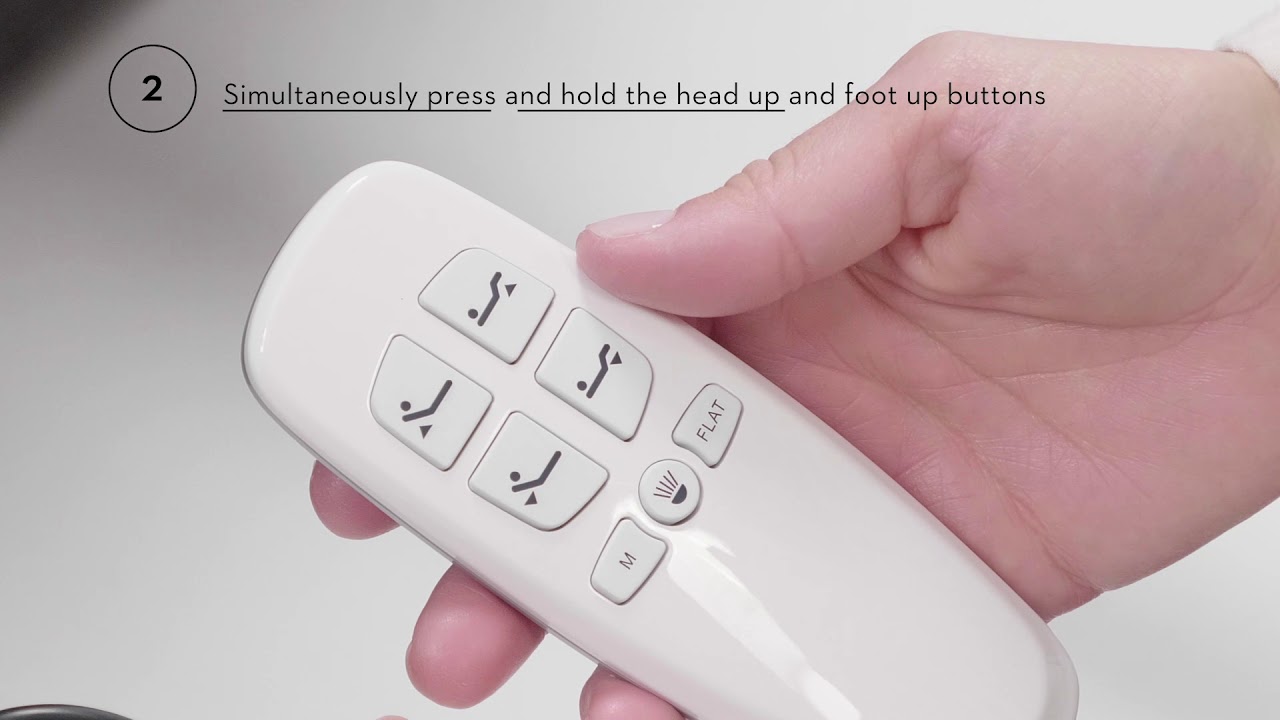
- While holding the pair button, press a button on the remote (usually “head up” or “stop”). Wait until you see a light flash on the receiver box or remote.
- Release both buttons.
- Test the remote to see if the bed responds.
If the bed moves, the reset was successful. If not, try the steps again or see the troubleshooting section.
Brand-specific Reset Instructions
While most beds follow similar steps, some brands have unique processes. Here are the common ones:
Leggett & Platt
- Unplug the bed for 1 minute.
- Plug it back in.
- Find the “learn” button under the bed.
- Press and hold the “learn” button until a light blinks.
- Press any button on the remote. The bed should respond.
Tempur-pedic
- Unplug power for 1 minute.
- Locate the “pair” button (often on the power box).
- Hold the button until you see a light flash.
- On the remote, press the “head up” and “foot up” buttons together for 5 seconds.
- The bed should reset and pair.
Reverie
- Unplug for 1 minute.
- Plug in and find the “pair” button.
- Hold for 5 seconds until the LED flashes.
- On the remote, press “head up” or “pair” for 5 seconds.
- Test the remote.
Ergomotion
- Unplug power.
- Plug in and locate the receiver box.
- Press “reset” with a pen for 5 seconds.
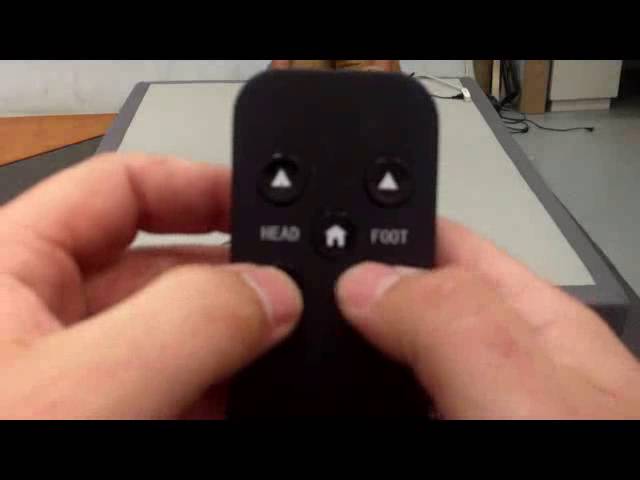
- On the remote, hold “head up” and “foot up” at the same time.
- Release when the bed moves.
Classic Brands
- Unplug power for at least 30 seconds.
- Plug in.
- Press “reset” on the receiver box.
- On the remote, press and hold “flat” for 5 seconds.
- The bed should now respond.
If you are unsure about your brand, check for a label, or visit the manufacturer’s website for manuals. You can also see a helpful resource at Wikipedia for background.
What To Do If Resetting Doesn’t Work
Sometimes, the normal reset steps do not fix the problem. Don’t panic. Go through these checks:
- Check power connections. Make sure the bed is plugged in and the outlet works.
- Try new batteries in your remote, even if the old ones look fine.
- Look for loose cables under the bed. Sometimes cables to the motors or receiver box get unplugged or loose.
- Test with a second remote if you have one. If the bed works with another remote, your main remote may be faulty.
- Move the bed to another outlet. Power strips can sometimes block enough power for the bed motors.
- Check for radio interference. Cordless phones, Wi-Fi routers, or microwaves near the bed can disrupt remote signals.
- Inspect for physical damage. If you see broken wires, cracked remotes, or water damage, contact support.
If these steps don’t help, it’s time to call customer service. Have your model number, purchase date, and a clear description of the problem ready.
Common Mistakes When Resetting Adjustable Bed Remotes
Many people make avoidable errors when trying to reset their adjustable bed remote. Here are the top mistakes and how to avoid them:
- Not waiting long enough after unplugging. Always wait at least 60 seconds to fully clear memory.
- Trying to reset while someone is on the bed. This is unsafe and can prevent the bed from resetting.
- Using old batteries. Even if the remote lights up, weak batteries can prevent pairing.
- Mixing up buttons. Some remotes need specific buttons for pairing (like “head up” or “flat”), not just any button.
- Missing the reset button. The button under the bed can be small and hard to find. Use a flashlight and look for a tiny hole or button near wires.
- Forgetting to check the outlet. Sometimes, a tripped breaker or dead outlet is the real problem.
- Ignoring the manual. Every brand is a little different. If you have your manual, follow its steps.
How To Identify Your Adjustable Bed Model
Knowing your bed’s brand and model is key to finding the right reset steps and getting help. You can usually find this information in these places:
- Under the bed: Look for a sticker on the frame or the receiver box.
- On the remote: Some remotes have the brand or model on the back.
- Your paperwork: Check your purchase receipt or warranty papers.
- Online order history: If you bought the bed online, your account will list the model.
Take a photo of the label or write down the details. This will save time if you need to call for help.
Comparison: Wired Vs Wireless Adjustable Bed Remotes
Not all remotes are the same. Here’s a simple comparison between wired and wireless remotes.
| Feature | Wired Remote | Wireless Remote |
|---|---|---|
| Connection | Cable, always connected | Radio signals, battery powered |
| Reset Frequency | Rarely needed | Sometimes after power loss |
| Common Issues | Physical damage, loose cable | Pairing lost, battery drain |
| Ease of Repair | Easy if cable is intact | May need pairing, more steps |
Insight: Many people think only the remote can fail. In reality, the receiver box under the bed is just as likely to lose pairing after power surges.
How Often Should You Reset Your Adjustable Bed Remote?
You do not need to reset your remote often. Most people only reset after a power outage, moving the bed, or replacing the remote/receiver. There is no harm in resetting once in a while, but frequent resets point to a deeper problem—such as a faulty receiver, bad outlet, or interference.
If you find yourself resetting every week, it’s time to check for:
- Nearby electronic devices (phones, routers)
- Old or failing batteries
- Poor power supply to the bed
- Signs of water or physical damage
Safety Tips When Resetting Adjustable Bed Remotes
Safety first is always the best practice with any electrical device. Adjustable beds are heavy and use powerful motors.
- Always unplug the bed before touching wires or the receiver box.
- Keep children and pets away during the reset process.
- Never open the motor housing or receiver box if the bed is under warranty—this can void your coverage.
- If you smell burning or see sparks, unplug the bed and call for service.
- Do not use the bed if it moves on its own after a reset—this is a sign of a serious electronics problem.
Programming Memory Buttons After Reset
Many modern remotes let you save favorite positions. After a reset, these are sometimes erased. Here’s how to reprogram them:
- Use the remote to move the bed to your favorite position.
- Press and hold the “memory” button (often “M” or “MEM”).
- While holding, press the number you want to assign (such as “1” or “2”).
- Release both buttons. A beep or light flash means it is saved.
Repeat for each position you want to save. Refer to your manual for your specific remote.
Table: Typical Reset Buttons By Brand
You may wonder what button to look for on your bed or remote. Here’s a quick guide:
| Brand | Reset/Pair Button Label | Usual Location |
|---|---|---|
| Leggett & Platt | Learn | Receiver box under bed |
| Tempur-Pedic | Pair | Power supply box |
| Reverie | Pair | Control box under frame |
| Ergomotion | Reset | Receiver under bed |
| Classic Brands | Reset | Receiver unit under bed |
Tip: The “reset” or “pair” button is usually recessed so you need a pen or paperclip to press it.
What To Do If You Lose Your Remote
Losing your adjustable bed remote is a common worry. Here’s what you can do:
- Check if your bed has a manual backup (wired button on the frame).
- Look for a replacement remote from your manufacturer. Many brands sell them online.
- Try a universal remote. Some adjustable beds can be paired with a generic remote, but check compatibility before buying.
- Use a smartphone app if your bed supports Bluetooth or Wi-Fi. Many new beds have this feature.
- Call customer service with your model number—they can suggest the best replacement.
Non-obvious insight: Some beds have a hidden button on the receiver box that lets you move the bed even if the remote is lost.

Credit: evercomfybed.com
Troubleshooting Remote Problems After Reset
You’ve done the reset, but things still aren’t right. Here’s what to check:
- Remote flashes but bed does not move: Receiver box may be damaged or not getting power.
- Bed moves on its own: There may be interference from another device or neighbor’s remote.
- Only some buttons work: Remote may have a stuck button or partial damage.
- Remote works only close to the bed: Battery is weak or there’s RF interference.
- Bed moves but lights or massage don’t: The feature may need separate pairing or has a different reset process.
Try a full reset again. If problems remain, write down what works and what doesn’t—this will help technical support solve your problem faster.
Table: Key Troubleshooting Steps
Here’s a quick overview of what to check if your adjustable bed remote still isn’t working after a reset.
| Problem | What to Check | Next Step |
|---|---|---|
| No response | Power, batteries, receiver box | Try reset again, replace batteries |
| Only some buttons work | Button contacts, remote damage | Clean or replace remote |
| Bed moves on its own | Nearby RF devices | Move other electronics away |
| Bed moves but massage/lights don’t | Separate pairing needed | Check manual for feature reset |
Extra tip: Always keep your warranty card and proof of purchase. Many brands offer free repair or replacement if problems happen early.
Credit: www.youtube.com
Frequently Asked Questions
How Do I Know If My Adjustable Bed Remote Needs To Be Reset?
You should reset your remote if the bed does not respond, moves the wrong way, or after a power outage. If the remote lights up but nothing happens, a reset usually helps.
Is It Safe To Reset My Adjustable Bed Remote Myself?
Yes, it is safe if you follow the steps and unplug the bed first. Never reset the bed with someone lying on it, as motors may move suddenly.
Will Resetting Erase My Favorite Positions?
Resetting the remote may erase saved memory positions, but basic controls will still work. You can reprogram your favorite positions after the reset.
What Should I Do If The Remote Still Does Not Work After Resetting?
Check the power, batteries, and all connections. Try resetting again. If it still fails, contact customer support with your model number for more help.
Can I Use A Universal Remote For My Adjustable Bed?
Some beds support universal remotes, but not all. Check your manual or contact the manufacturer before buying a replacement.
Getting your adjustable bed remote working again often takes just a few careful steps. Most problems are simple to fix with a reset, fresh batteries, and checking connections. If you run into trouble, don’t worry—help is available. With the right approach, you’ll get back to a great night’s sleep and full control of your bed.